↗
Sell tickets online
Create paid ticket types such as General Admission, VIP, Early Bird, Kids, Family, Tables and more.
Create your event for free with DynoDine. Sell tickets online, issue tickets for Zelle, cash and complimentary guests, scan QR codes at the door, email attendees and track everything from one dashboard.
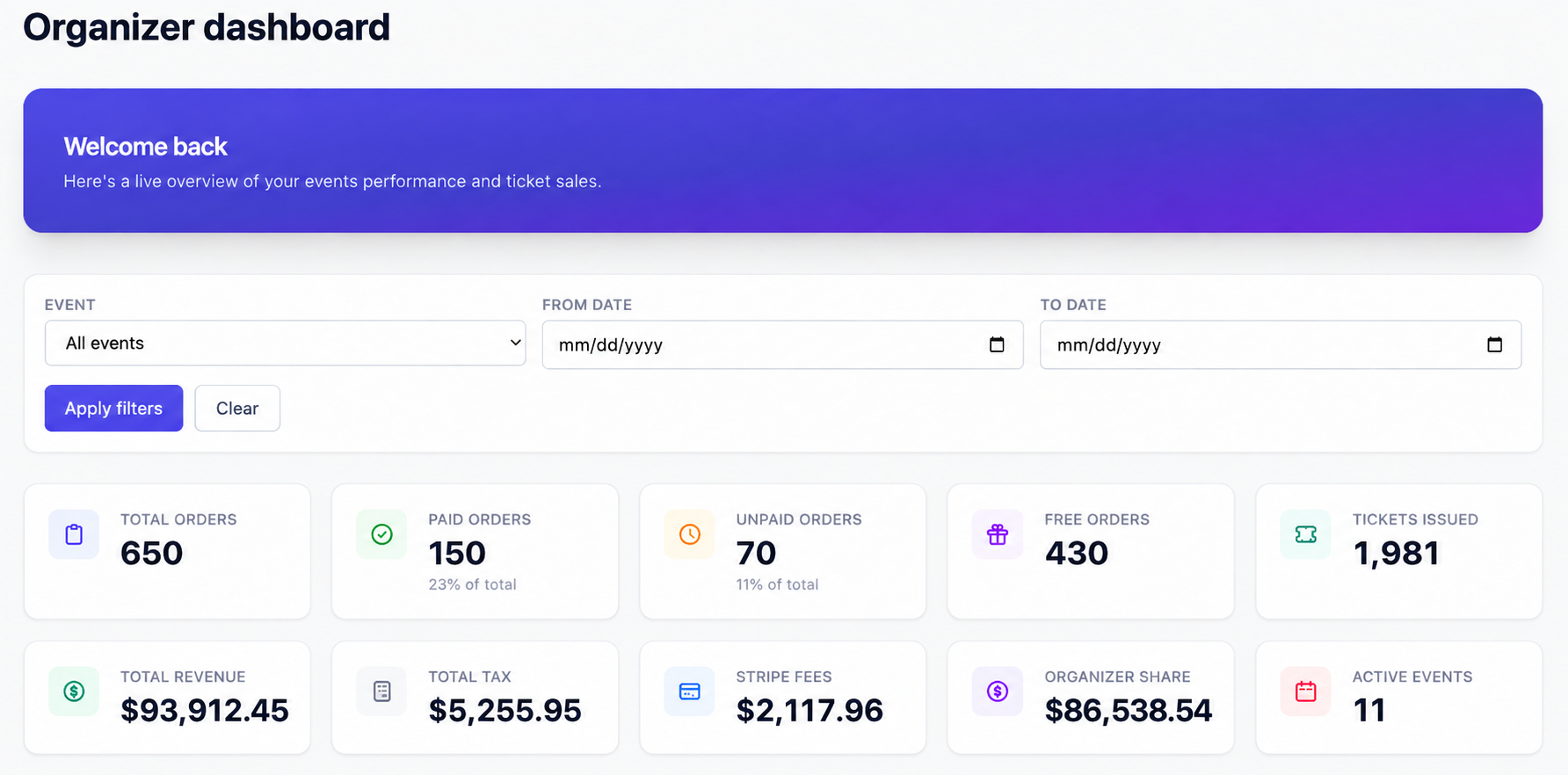
See orders, tickets, revenue, fees, taxes, organizer share and active events from one dashboard.
Upload sponsor logos, company names and details directly to your event. DynoDine helps you give partners prominent visibility on the event page and on printed tickets.
Made possible with support from our partners.
DynoDine is designed around the entire event journey — discovery, ticketing, guest communication, check-in and reporting.
Create paid ticket types such as General Admission, VIP, Early Bird, Kids, Family, Tables and more.
Record offline payments or complimentary guests and still send an official ticket that appears in your attendee list.
Scan tickets at the entrance, search guests by name and see who has arrived in real time.
Send reminders, parking info, schedule changes and last-minute announcements to your attendees.
Keep ticket orders, guest sources, totals and event-day attendance together instead of juggling spreadsheets.
Publish a shareable event page on Happenings and become eligible for additional visibility across DynoDine channels.
Upload sponsor logos and details, highlight main and supporting sponsors, and include sponsor logos on printed tickets.
Support organizer promotions, VIP access, sponsor allocations and controlled ticket categories without creating manual workarounds.
Add your event details, ticket types and pricing, then publish a mobile-friendly event page you can share everywhere.
Get help with event setup, ticketing, attendee management, check-in and settlement questions when you need it.
Not every guest pays through online checkout. If someone pays you directly by cash or Zelle, you can record the booking and issue them an official DynoDine ticket with a QR code. You can also create complimentary tickets for sponsors, performers, volunteers, VIPs and other invited guests.
Everything stays organized: every online, cash, Zelle and complimentary guest appears in one attendee list and uses the same QR check-in flow.
Transparent pricing helps you understand what you keep and what attendees pay.
Build the page, set ticket types and publish.
DynoDine convenience fee can be shown separately to the buyer.
Issue and track Zelle, cash, sponsor, VIP and complimentary tickets in the same system.
Create, publish, sell, manage and check in guests from one connected workflow.
Add the event title, image, date, venue, description and organizer details.
Add General, VIP, Early Bird, Family, Kids, Tables, Sponsor or other ticket types.
Share one clean event link across WhatsApp, Instagram, Facebook, email and your own website.
Accept online orders and add Zelle, cash or complimentary guests without breaking your workflow.
Check in guests with QR codes, monitor attendance and keep your final event records together.
Your event does not have to live as an isolated payment link. DynoDine already connects people with restaurants, deals and local happenings.
From community celebrations to large performances, DynoDine can support many kinds of ticketed experiences.
Clear answers about selling tickets, fees, payouts, check-in, offline payments, promotion and sponsor visibility.
Create your event in DynoDine, add the event details and ticket types, set your prices and publish the event page. Share the event link with your audience and buyers can purchase tickets online and receive their event ticket.
There is no upfront fee to create and list your event on DynoDine. For paid online tickets, DynoDine uses a convenience-fee model and card-processing fees apply to online card payments.
DynoDine does not charge an upfront event-listing fee. The current DynoDine convenience fee is 3% for paid online tickets, with card-processing fees handled separately.
DynoDine can show the convenience fee separately to the customer at checkout, allowing the organizer to keep the intended ticket price. Card-processing fees are separate from the DynoDine convenience fee.
Organizers can create multiple ticket categories for the same event, including General Admission, VIP, Early Bird, Kids, Couple, Family, Table, Sponsor and Complimentary ticket types.
Yes. If a guest pays you directly by cash or Zelle, you can record the booking and issue an official DynoDine ticket. The guest stays in the same attendee list and can use the same QR-code check-in process as an online buyer.
Yes. You can issue complimentary tickets for sponsors, performers, volunteers, VIPs, media, friends, family or other invited guests and keep them in the same attendee-management system.
Each eligible DynoDine ticket can include a QR code. At the event entrance, staff can scan the ticket and update the attendee's check-in status so the organizer can track who has arrived.
Your event gets a public, shareable DynoDine page that you can promote through WhatsApp, Instagram, Facebook, email, QR codes and your own marketing channels. Events can also appear in DynoDine Happenings, with additional DynoDine promotional opportunities where applicable.
Yes. Organizers can use attendee communication for reminders, parking details, venue instructions, schedule changes and important event announcements.
DynoDine's organizer settlement target is less than 10 days. The exact settlement timing for an event can depend on the payment and event setup.
Yes. Organizers can upload sponsor logos, company names and sponsor details, feature main and supporting sponsors on the event page, and include sponsor logos on supported printed-ticket layouts.
DynoDine can support many event formats, including concerts, cultural and community events, festivals, food and nightlife events, comedy shows, performances, family events, workshops, networking events, dance programs and other ticketed experiences.